Start with the decision, not the reminder
When someone has already seen your estimate, the main job is to find out what is still blocking a decision. A simple follow-up process should help you identify whether the customer is waiting on approval, comparing options, checking budget, or needing a revised scope. That is more useful than sending the same general check-in again.
A sales plan maps the steps customers take to buy. For estimate follow-up, that means you should think in stages: sent, waiting, agreed, and closed. The point is not to fill every gap with more messages. The point is to know what decision is pending and what action the customer has already said is acceptable next.
Set up the estimate follow-up board
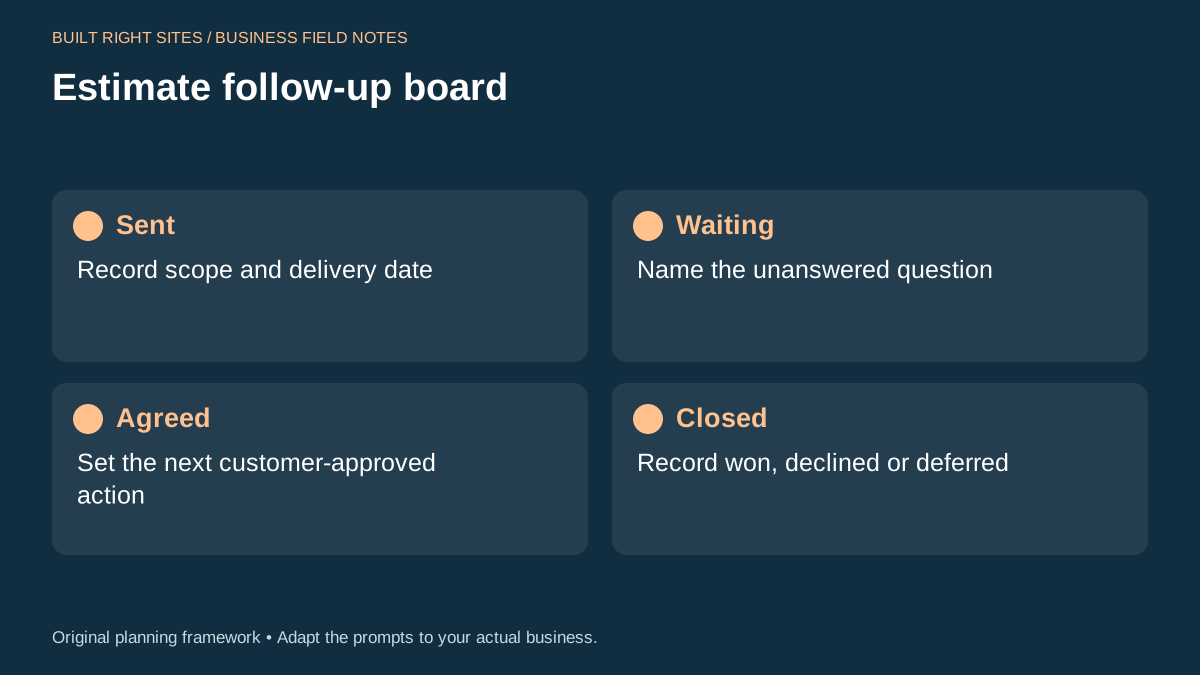
The estimate follow-up board in the worksheet is meant to be a simple planning tool, not a database or automation system. It has four cards: Sent, Waiting, Agreed, and Closed. Each card helps you note one part of the conversation so you can act on the next step instead of re-starting the whole discussion.
Use Sent for the scope and delivery date of the estimate. Use Waiting for the unanswered question. Use Agreed for the next customer-approved action. Use Closed for the final result, whether the estimate was won, declined, or deferred. The worksheet is useful for manual tracking, but it does not store messages, send reminders, or replace your own judgment about tone and timing.
A practical way to use it is to write one job per card set. Then add short notes that answer three questions: what did you send, what is still unresolved, and what action is allowed next? Keep the notes short so the board stays readable when you have several open inquiries at once.
See example business websites with clear services and contact paths for an example of how this can work on a site.
Use the board to choose your next message
The board should change the message you send. If the Waiting card says the customer is awaiting landlord approval, your follow-up should focus on that specific dependency. If the card says they need a revised scope, your message should offer the revision path rather than asking if they are “still interested.”
Here is a simple rule: do not ask a question you already know the customer cannot answer yet. Instead, ask about the missing piece that is actually blocking movement, or offer the next approved step. That keeps the conversation practical and makes it easier to move from estimate to decision.
A note like “Waiting: landlord approval” tells you to stay focused on permission, not persuasion. A note like “Agreed: send revised option after budget review” tells you to prepare the revision and wait for the agreed moment, rather than sending another broad follow-up.
For the next part of this process, read Give missed calls a clear next step.
Worked example: a tenant improvement job waiting on approval
Imagine a small office contractor sends an estimate for a tenant improvement project. The customer replies that the landlord must approve any changes before work can start. The contractor enters the job like this: Sent: estimate sent for office paint, lighting changes, and trim work; Waiting: landlord approval; Agreed: send revised scope if landlord requests changes; Closed: not set yet.
A useful follow-up message in that case could be: “Hi Jordan, I wanted to check whether the landlord has had a chance to review the scope. If they want any changes, I can revise the estimate around those comments. If you already have a preferred next step, send it over and I will match the paperwork to it.”
That message does not repeat the whole estimate. It names the blocker, offers the next approved action, and leaves room for a response that is actually useful. If the customer says the landlord wants a shorter schedule, the contractor can discuss scheduling feasibility before revising any agreed scope.
Put this into practice
Estimate follow-up board
- Sent: Record scope and delivery date
- Waiting: Name the unanswered question
- Agreed: Set the next customer-approved action
- Closed: Record won, declined or deferred
An original planning framework from Built Right Sites, not a validated benchmark.
Write follow-up messages that ask for progress, not pressure
For active inquiries, your follow-up should sound like a practical next step. One message can ask whether the customer has a decision item, and another can offer a specific revision or next action. Keep the tone polite and direct, and keep the focus on the customer’s process rather than your own need for an answer.
Sample message one: “Hi Sam, I’m checking in on the estimate I sent for the repair work. Is there one part still blocking a decision, such as scope, timing, or approval? If so, I can address that directly.”
Sample message two: “Hi Sam, if the estimate is waiting on someone else’s approval, I can help by revising the scope or sending the same details in a different format. Let me know what would make it easier to move forward.”
Those messages are better than repeating “just following up” because they ask about the real blocker and point to a concrete next step. If there is no movement after that, mark the job as closed or deferred instead of continuing to ask the same question again.
A simple estimate follow-up process works best when it helps you identify the blocker, record the customer’s last agreed step, and send the next message based on that record. The worksheet is most useful as a manual decision aid, not as a replacement for judgment or conversation. If you keep the notes short and specific, you can follow up without sounding repetitive and without losing track of where each estimate stands.
Related articles
See how your next website could work
A clear site gives interested customers a useful next step. Explore a homepage for your business, then decide whether it fits.
See my free homepageSources and further reading
- SBA: Marketing and sales — A sales plan describes the steps customers take to buy.
Sources checked October 18, 2026. The worksheets and practical recommendations are our editorial guidance. AI-assisted drafting; reviewed before publication.