Start with what the photo can honestly show
The safest caption starts with the visible project itself. Name the project type, then describe only the work shown in the image. If the photo shows a monument sign install, say that. If it shows a planted bed or a new graphic panel, say that instead of trying to explain business impact.
A useful caption should answer a simple question: what did this crew put in place, change, or finish? That keeps the writing grounded in the image instead of drifting into claims about sales, traffic, or customer response that the photo cannot prove.
Write About design choices without overstating impact
Many small-business captions go wrong when they turn a visible choice into a performance claim. A better approach is to describe the choice itself. You can say a sign used a centered layout, or that a landscape bed used low plants near an entryway. Those are factual and easy to verify.
If you want to explain why a choice matters, keep the wording careful. For example, you might say a taller sign face can be easier to notice from the street, but do not say it brought in more calls unless you have actual tracking. The same rule applies to landscape work: describe the placement, plant type, and finish, not the business outcome unless you measured it separately.
One brief source note worth keeping in mind is that descriptive filenames and nearby context help explain images. In practice, that means your caption should support the photo instead of competing with it.
See example business websites with clear services and contact paths for an example of how this can work on a site.
Protect customer privacy and approval boundaries
A project caption should not reveal more than the customer wants shared. If a business owner asked for privacy, keep the caption general and skip names, addresses, or identifying details. Even when the work looks impressive, the caption should follow the approval boundary set by the client.
It is also smart to separate approved facts from your own interpretation. If the customer approved a clean, modern sign package, write that the project used a clean, modern look only if that wording was part of the approved description or is clearly visible. If the client did not approve public posting of a location, avoid naming the site in the caption.
For a small business, this is not just a writing issue. It is part of field-to-website workflow. Someone on the crew or office side should confirm what can be shared before the caption goes live. That habit reduces later edits and keeps the public gallery consistent.
For the next part of this process, read Organize vehicle graphics for your buyers.
Worked example: before, after, and the decision behind it
Here is a fully hypothetical example for a landscape company post. The photo shows a finished entry bed with new mulch, three drought-tolerant shrubs, and a stone border. No numbers were measured for customer response, and no before-and-after traffic data exists.
Weak caption: “This project transformed the entrance and boosted curb appeal.” Better caption: “Commercial entry bed installation with new mulch, three drought-tolerant shrubs, and a stone border. The layout places the taller shrubs toward the back edge and keeps the front line open for visibility.”
The better version works because it names the project, describes the visible scope, and explains one design choice. It does not claim a business result. If the company also wants a privacy-safe version, it could use: “Entry bed refresh for a local retail site, showing new mulch, three shrubs, and a stone border arranged for a clean front view.”
Put this into practice
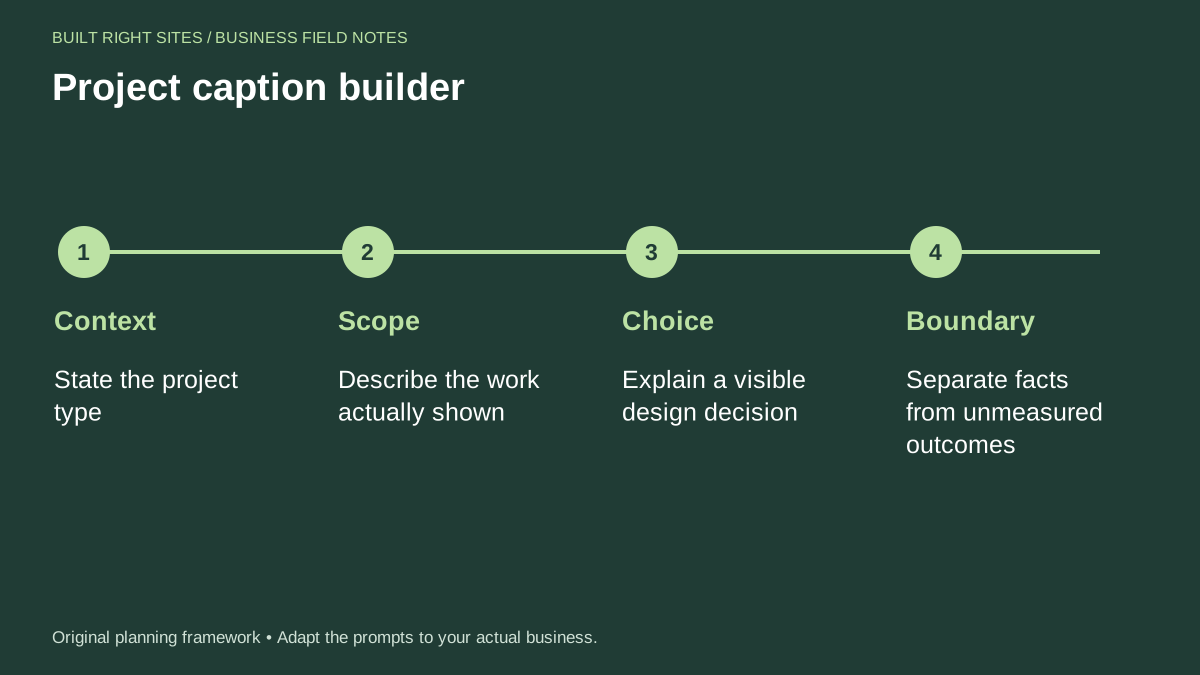
Project caption builder
- Context: State the project type
- Scope: Describe the work actually shown
- Choice: Explain a visible design decision
- Boundary: Separate facts from unmeasured outcomes
An original planning framework from Built Right Sites, not a validated benchmark.
Edit captions for website use, not just social posts
A caption on a website should do more than sound polished. It should help a visitor understand the project and move toward the next step, such as viewing related work or contacting the business. That means keeping the caption short, specific, and easy to scan.
For a sign or landscape business, it also helps to use the same language across the photo, the page heading, and the service description. If the page says commercial landscape maintenance, do not call the same work a site makeover in the caption unless that is truly what was approved. Consistency makes the page easier to read and reduces confusion.
Good caption editing is partly a process problem. Gather the photo, the job note, the approval details, and the privacy rule before you write. Then apply the worksheet, draft one caption, and cut any phrase that sounds like a promise instead of a fact. That method is plain, but it keeps the copy honest and useful.
The best project caption is accurate, specific, and limited to what the business can verify. If you describe the project type, the visible scope, one design choice, and the boundary between fact and outcome, you can present real work without making claims you cannot support. That approach is useful for sign and landscape businesses that want clear public photos, careful privacy handling, and captions that help visitors understand the job at a glance.
Related articles
See how your next website could work
A clear site gives interested customers a useful next step. Explore a homepage for your business, then decide whether it fits.
See my free homepageSources and further reading
- Google Search Central: Image best practices — Descriptive filenames and nearby context help explain images.
Sources checked October 18, 2026. The worksheets and practical recommendations are our editorial guidance. AI-assisted drafting; reviewed before publication.