Start with the buyer’s decision, not the photo
If a visitor is deciding between van lettering and a full wrap, the portfolio should make that comparison obvious within a few clicks. Organize examples by the question the buyer is trying to answer, such as: What kind of vehicle is this? How much of it is covered? Is this a one-off project or part of a fleet?
That structure is more practical than sorting only by finished look. A clean image can still be hard to use if the visitor cannot tell whether it shows a compact van, a box truck, or a matched fleet design. The goal is to help the buyer compare options that fit their own vehicle and buying scope.
Write captions that answer the next question
A good caption should do more than repeat the project name. It should tell the buyer what makes the example relevant. If the photo shows a compact service van with side lettering, say so directly. If it shows a full wrap on a larger vehicle, make that clear too. The caption should help the reader move from curiosity to comparison.
Use descriptive file names and nearby text that matches the image. Google Search Central says descriptive filenames and nearby context help explain images. For a portfolio, that means a name like service-van-lettering-side-view is more useful than IMG_4821. The caption can also set expectations by saying whether the image is a concept, a finished project, or a fleet match. That kind of labeling reduces confusion when two projects look similar at first glance.
Explore sign-company website layouts for services and project inquiries for an example of how this can work on a site.
Sort by coverage so buyers can compare choices
Coverage is often the fastest way for a buyer to narrow the field. Someone who wants a simple contact-focused look does not need to wade through full-wrap examples first. Someone comparing a more visual treatment may want to move from partial graphics to full coverage. Organizing by coverage makes the portfolio easier to scan and helps each example answer a different stage of the decision.
You do not need to force every project into a strict visual category if that would hide the reason it belongs in the portfolio. The point is to make the comparison useful. For example, a partial graphic on a service van may be a better comparison for a local contractor than a dramatic full wrap on a box truck. The portfolio should show both, but it should not make the buyer hunt for the right one.
For the next part of this process, read Write project captions with real details.
Treat fleet consistency as its own decision
Fleet work raises a different question than a single vehicle: how will the design stay consistent across multiple units with different body shapes? A portfolio that groups fleet examples together can show that consistency is a design choice, not an afterthought. Even if the vehicles are not identical, the viewer should be able to see the shared layout, color treatment, or naming pattern.
A helpful portfolio does not need to claim more than it can show. If the project is one vehicle from a larger system, say so. If the design was adapted for different vehicle types, note that the portfolio image is showing the matched approach rather than pretending every unit is identical. That kind of honesty makes the examples easier to trust and easier to compare.
Put this into practice
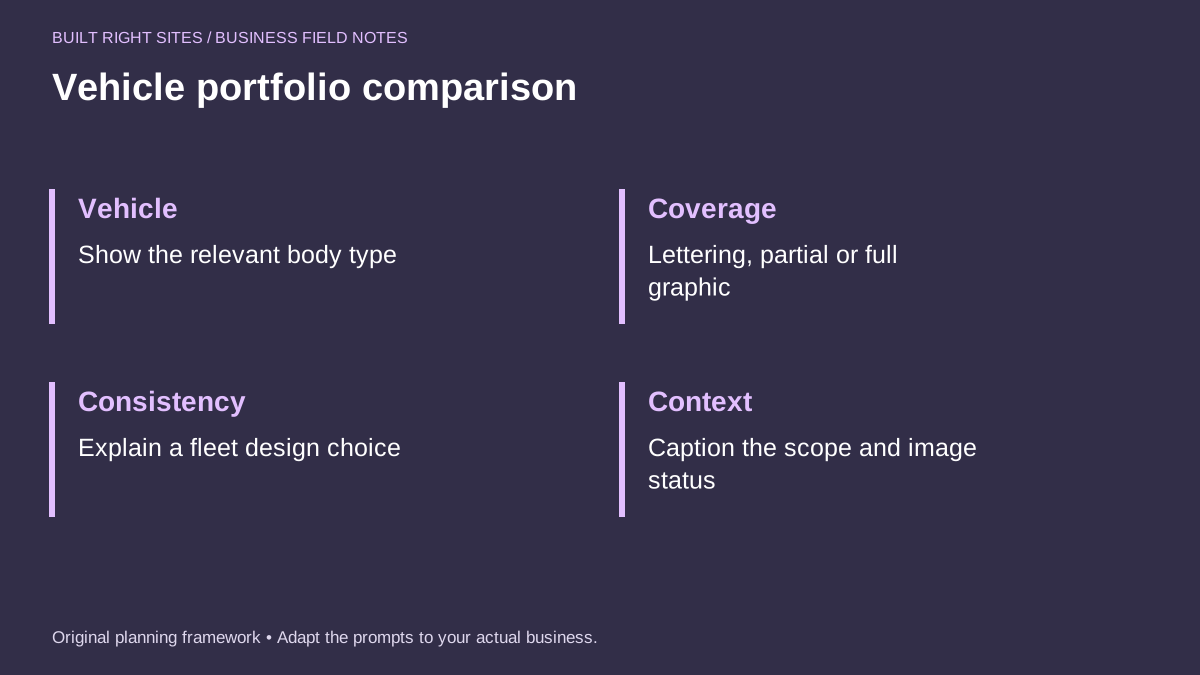
Vehicle portfolio comparison
- Vehicle: Show the relevant body type
- Coverage: Lettering, partial or full graphic
- Consistency: Explain a fleet design choice
- Context: Caption the scope and image status
An original planning framework from Built Right Sites, not a validated benchmark.
Worked example: a simple buyer path for one portfolio page
Imagine a visitor is a plumbing contractor comparing options for a new service van. The buyer wants to know whether a simple lettering package is enough or whether a more visible graphic might fit better. A practical portfolio page could open with three entries in this order: a compact van with side lettering, a mid-size van with a partial graphic, and a larger van with a full wrap. Each example should have a clear caption.
One caption might read: "Compact service van, side lettering, finished project." Another could read: "Mid-size service van, partial graphic, concept shown for layout review." A third could read: "Full-size van, full graphic, fleet match for a two-vehicle service team." That set of labels gives the buyer a direct comparison without forcing them to guess what each image represents. If the visitor is focused on a single service van, the first example is the easiest reference point. If the buyer wants stronger visibility, the second and third examples help them compare scope before they ask for help.
A well-organized vehicle graphics portfolio does not need more images; it needs clearer decisions. If you sort examples by vehicle type, coverage, and fleet consistency, then label each one with plain context, visitors can compare options faster and with less guessing. That makes the portfolio more useful as a sales conversation starter and more helpful for buyers who already know what kind of vehicle graphics they want to explore.
Related articles
See how your next website could work
A clear site gives interested customers a useful next step. Explore a homepage for your business, then decide whether it fits.
See my free homepageSources and further reading
- Google Search Central: Image best practices — Descriptive filenames and nearby context help explain images.
Sources checked October 18, 2026. The worksheets and practical recommendations are our editorial guidance. AI-assisted drafting; reviewed before publication.