Start with the minimum needed to respond
The first version of a sign shop quote form should be short and clear. Ask for the customer’s name, a way to reply, and the project location. Those three pieces tell you who is asking, how to reach them, and where the work belongs. You can then decide whether the request is a storefront sign, vehicle graphic, or another type of project.
Next, ask for the basic project goal in plain language. A customer does not need to write a technical specification to begin. A simple prompt such as “What do you need the sign to do?” can help them explain whether they want visibility from the street, branding on a storefront, a temporary promotion, or vehicle identification. After that, ask for a desired date if they have one. Keep it clear that this is a request, not a promise of availability or price.
Separate first-contact questions from technical details
Do not make first-contact visitors guess about engineering, permits, or electrical requirements. Those topics can matter, but they are usually better handled after someone from your shop follows up and learns more about the project. If you ask for too much too early, people may stop filling out the form or give inaccurate answers just to get through it.
Instead, use the first contact to collect only the information needed to begin the conversation. Then, after contact, you can ask about mounting conditions, power access, existing structure, local requirements, or anything else that affects the work. This is a practical way to keep the form readable and reduce confusion.
See how a sign-company website can organize services and quote requests for an example of how this can work on a site.
Use the right question set for the project type
Vehicle graphics and storefront signage often need different information. For vehicle work, ask what vehicle will be wrapped or lettered, and whether the customer can share photos of the vehicle from the side, rear, or other useful angles. Those photos can help your team understand the available space and the condition of the surface without asking the customer to measure every detail.
Make artwork and photos optional but useful
Artwork and photos can speed up the quoting conversation, but they should remain optional unless your process truly requires them. A customer may have a logo file, a storefront photo, or a vehicle image ready to upload. Another customer may only have a rough idea and need help gathering materials later. Your form should work for both.
When you ask for attachments, explain why they help. For example, a storefront photo can show where the sign sits on the building, and a logo file can help confirm the visual direction. Clear instructions matter here. The W3C forms guidance emphasizes concise forms with visible labels, useful feedback, and asking only for information necessary to the process.
Put this into practice
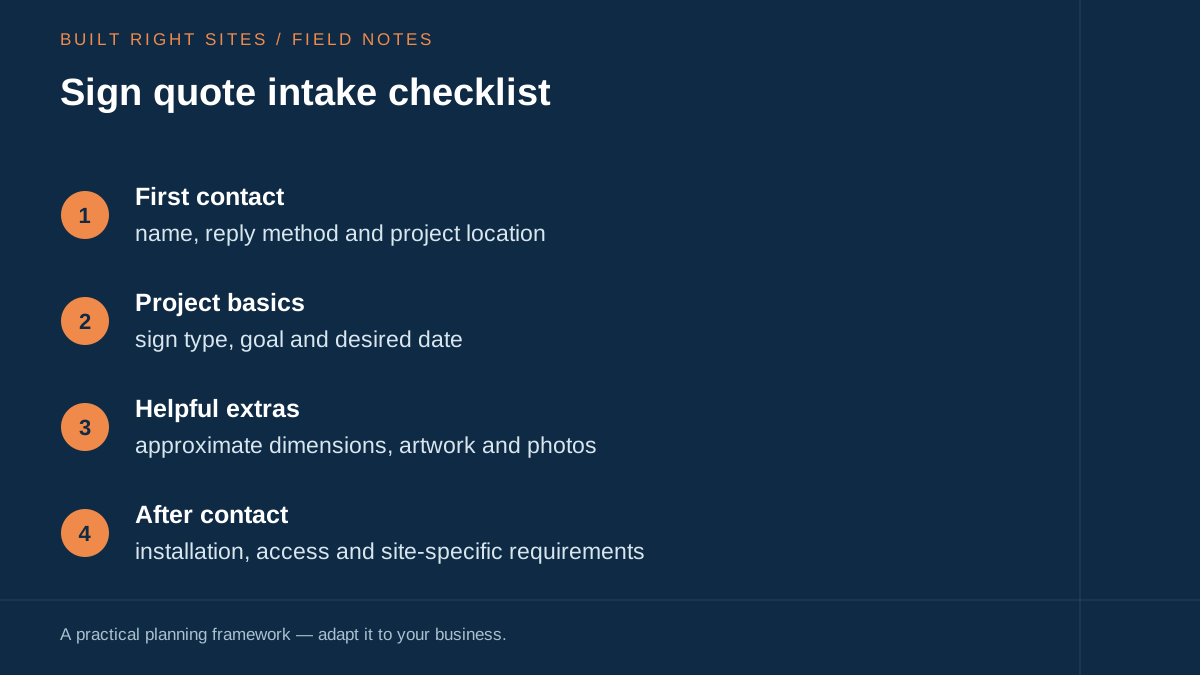
Sign quote intake checklist
- First contact: name, reply method and project location
- Project basics: sign type, goal and desired date
- Helpful extras: approximate dimensions, artwork and photos
- After contact: installation, access and site-specific requirements
An original planning framework from Built Right Sites, not a validated benchmark.
Try the checklist with two different projects
Imagine a retailer asking for a new storefront sign and a contractor asking for van graphics. Both need a way to leave contact details and describe the job. The storefront inquiry also needs a project location and desired opening date. The vehicle inquiry benefits from the vehicle make, model, year, and number of vehicles, when known.
Complete the worksheet once for each project type. Mark every question as needed now, useful if available, or something your team should confirm later. A customer who does not know the wall dimensions should still be able to ask for help; make “not sure” a real path through the form.
Write the confirmation before launching the form: “Thanks—we received your project details. Our team will review them and contact you about the next step. This request is not a final quote.” Adjust that wording to your real process. Test the entire path with an attachment and without one.
Turn the form into a practical follow-up process
A sign quote request form works best when it connects to a real response process. After the form is submitted, someone should review the request, confirm the project type, and ask for the next set of details. That next set may include installation conditions, access, power, mounting surfaces, or measurements that the customer could not know in advance.
Build a simple internal checklist so staff know what to ask by project type. A storefront sign may need different follow-up questions than vehicle graphics. A service response that matches the project type will feel more organized to the customer and can reduce back-and-forth later.
Keep the language simple and the path clear
Plain language matters. A small-business owner filling out a form should not need to translate industry jargon before they can ask for help. Use visible labels, short prompts, and direct wording that tells the customer what to do next. That is consistent with the general forms guidance from W3C: make the form easy to understand, and ask only for what you need at that moment.
Also, do not bury the next step. If the customer can submit with incomplete measurements or missing photos, say so clearly. If they need to wait for a follow-up before technical questions are answered, say that too. A straightforward sign shop quote form can reduce confusion and improve the quality of the first conversation without pretending to solve every project detail at once.
A strong sign quote request form should help a customer reach out quickly, not force them to know technical details before they have spoken with your shop. Start with contact information, project basics, and optional supporting material, then gather installation and site-specific details after contact. If you keep the form short, separate early questions from later ones, and make room for unknown measurements, you can make the intake process easier to understand for both storefront signage and vehicle graphics.
Related articles
See how your next website could work
A clear site gives interested customers a useful next step. Explore a homepage for your business, then decide whether it fits.
See my free homepageSources and further reading
- W3C: Forms tutorial — Use concise forms with visible labels, instructions and useful feedback. Request only information necessary for the process.
Sources checked October 18, 2026. The worksheets and practical recommendations are our editorial guidance. AI-assisted drafting; reviewed before publication.